
Transparent Proxying
A conventional proxy has to be configured by hand on every device. A transparent proxy works one layer down, at the gateway: LAN devices only point their default gateway and DNS at the proxy machine, and all TCP traffic gets intercepted and forwarded to the upstream proxy automatically. The devices themselves need no proxy configuration.
That is especially useful for devices where setting a proxy is awkward: smart TVs, IoT gadgets, game consoles.
How trans_proxy Works
trans_proxy is a transparent proxy written in Rust, running on macOS and Linux on top of the tokio async runtime. The overall architecture looks like this:
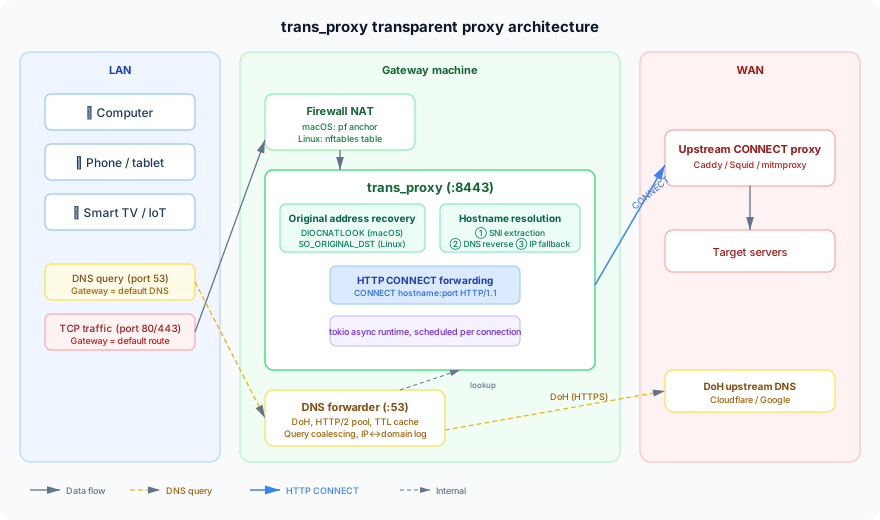
Original Destination
The first problem a transparent proxy has to solve: once NAT has redirected the traffic to trans_proxy's listening port, how do you know where the client actually wanted to go?
trans_proxy does this differently on the two platforms:
- macOS (pf): queries pf's NAT state table through the
DIOCNATLOOKioctl to get the destination the connection had before it was redirected - Linux (nftables): reads the original destination with a
SO_ORIGINAL_DSTgetsockopt on the accepted socket
Resolving the Hostname
Once you have the original IP and port, you still have to turn the IP back into a domain name, because an upstream HTTP CONNECT proxy wants a request in CONNECT hostname:port form. trans_proxy picks the hostname in this order:
- SNI extraction: for TLS connections (port 443), parse the SNI extension in the ClientHello to get the domain the client is asking for, without decrypting any TLS traffic
- Reverse DNS lookup: if the built-in DNS forwarder is enabled, trans_proxy records DNS answers and can look up which domain an IP belongs to
- IP fallback: if neither works, just use the IP
Built-in DNS Forwarder
trans_proxy ships a DNS forwarder that listens on port 53 of the gateway interface. It provides:
- DNS-over-HTTPS (DoH): sends DNS queries to an upstream DNS server over HTTPS (Cloudflare by default), avoiding DNS poisoning
- HTTP/2 connection pool: reuses HTTP/2 connections to cut DoH query latency
- TTL cache: caches answers according to the TTL on the DNS record
- Query coalescing: merges concurrent queries for the same domain so the request is not repeated
Beyond serving DNS, the answers it records are what the hostname resolution above uses to map an IP back to a domain.
Firewall Integration
trans_proxy manages firewall rules through scripts:
- macOS: uses pf's anchor mechanism, hanging the NAT redirect rules off a separate anchor so the system's existing pf rules are untouched
- Linux: creates a separate nftables table, again without disturbing the existing firewall config
Build and Install
# Clone the repo
git clone https://github.com/madeye/trans_proxy.git
cd trans_proxy

# Build (needs Rust 1.70+)
cargo build --release

# The binary lands in target/release/trans_proxy
Usage
macOS
Say the gateway machine's network interface is en0 and the upstream HTTP CONNECT proxy runs locally on 127.0.0.1:1082:
# Start trans_proxy (with the DNS forwarder enabled)
sudo ./trans_proxy --upstream-proxy 127.0.0.1:1082 --dns

# Set up the pf NAT redirect rules
sudo scripts/pf_setup.sh en0 8443
Linux
Say the gateway interface is eth0 and the upstream proxy is on 127.0.0.1:7890:
# Start trans_proxy
sudo ./trans_proxy --upstream-proxy 127.0.0.1:7890 --dns --interface eth0

# Set up the nftables rules
sudo scripts/nftables_setup.sh eth0 8443
Main Options
| Option | Default | Description |
|---|---|---|
--listen-addr | 0.0.0.0:8443 | Address trans_proxy listens on |
--upstream-proxy | (required) | Upstream HTTP CONNECT proxy address |
--dns | off | Enable the built-in DNS forwarder |
--interface | en0 / eth0 | Gateway network interface |
--dns-upstream | Cloudflare DoH | Upstream DNS server (UDP or DoH) |
--log-level | info | Log level (trace/debug/info/warn/error) |
-d / --daemon | off | Run as a daemon |
Client Setup
Devices on the LAN need two things:
- Set the default gateway to the IP of the machine running trans_proxy
- Set the DNS server to the same IP (if you enabled
--dns)
macOS, iOS, Windows, Linux, Android and the other major platforms all support this, and nothing has to be installed on the device.
Install as a Service
trans_proxy can install itself as a system service in one step:
sudo ./trans_proxy --upstream-proxy 127.0.0.1:1082 --dns --install
- macOS: creates a LaunchDaemon that starts at boot
- Linux: creates a systemd unit, and uses
ExecStartPre/ExecStopPostto load and clear the nftables rules automatically
To uninstall:
sudo ./trans_proxy --uninstall
Troubleshooting
When something goes wrong, turn up the log level first and watch:
sudo ./trans_proxy --upstream-proxy 127.0.0.1:1082 --dns --log-level debug
Common problems:
/dev/pfpermission errors (macOS): make sure you are running as root- NAT lookup fails: check that the firewall rules loaded correctly (
pfctl -saon macOS,nft list ruleseton Linux) - Connection timeouts: confirm the upstream proxy is healthy, and check whether IP forwarding is on for the gateway machine (Linux needs
sysctl net.ipv4.ip_forward=1) - DNS resolution fails: confirm no other process is holding port 53 (
lsof -i :53)
Pairing with Caddy
trans_proxy needs an upstream HTTP CONNECT proxy. If you don't have one, the earlier post shows how to build one with Caddy. The typical combination is:
LAN device → trans_proxy (gateway) → Caddy HTTPS forward proxy (remote server) → target site
That way LAN devices need no configuration at all and everything is forwarded through an encrypted tunnel.
Wrap-Up
The core problem trans_proxy solves is letting every device on a LAN go through a proxy without configuring anything. What you get:
- Zero-config clients: devices only change gateway and DNS, with no software to install and no proxy to set
- Cross-platform: works as a gateway on both macOS (pf) and Linux (nftables)
- DNS poisoning protection: the built-in DoH forwarder fixes DNS poisoning at the source
- Non-invasive firewall changes: the anchor and separate-table approach leaves existing rules alone
- Async performance: built on tokio, each connection scheduled independently, which suits the concurrency a gateway sees